Developer guide
- Acknowledgements
- Setting up, getting started
- Design
- Implementation
- Documentation, logging, testing, configuration, dev-ops
- Appendix: Requirements
-
Use cases
- UC1: Add a person
- UC2: Edit a person’s details
- UC3: Find a person
- UC4: List every person
- UC5: Delete a person
- UC6: Add a group
- UC7: Display a group
- UC8: List all groups
- UC9: Delete a group
- UC10: Add a person to a group
- UC11: Remove a person from a group
- UC12: Assign a task to a member
- UC13: Remove a task from a member
- UC14: Group assignment of task
- UC15: Group removal of task
- Non-functional requirements
Acknowledgements
-
This project is based on the AddressBook-Level 3 project created by the
SE-EDU initiative. -
The idea for
UniqueGroupListis replicated from that ofUniquePersonList. -
The formula used to determine the colour gradient for the
workloadused inPersonCardis adapted fromhere
Setting up, getting started
Refer to the guide Setting up and getting started.
Design
 Tip: The
 .puml files used to create diagrams in this document can be found in the diagrams folder. Refer to the PlantUML Tutorial at se-edu/guides to learn how to create and edit diagrams.
Architecture
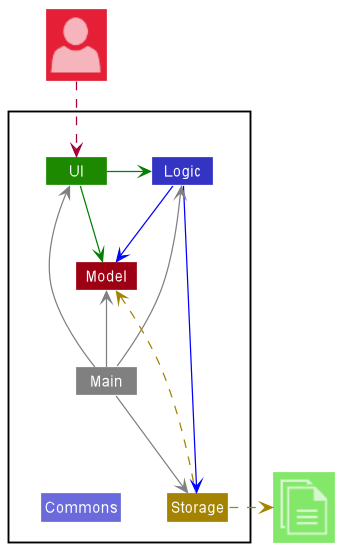
The Architecture Diagram given above explains the high-level design of the App.
Given below is a quick overview of main components and how they interact with each other.
Main components of the architecture
Main has two classes called Main and MainApp. It is responsible for,
- At app launch: Initializes the components in the correct sequence, and connects them up with each other.
- At shut down: Shuts down the components and invokes cleanup methods where necessary.
Commons represents a collection of classes used by multiple other components.
The rest of the App consists of four components.
-
UI: The UI of the App. -
Logic: The command executor. -
Model: Holds the data of the App in memory. -
Storage: Reads data from, and writes data to, the hard disk.
How the architecture components interact with each other
The Sequence Diagram below shows how the components interact with each other for the scenario where the user issues the command deleteperson John.
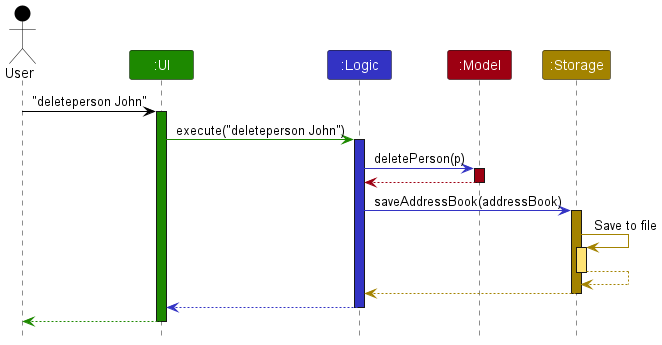
Each of the four main components (also shown in the diagram above),
- defines its API in an
interfacewith the same name as the Component. - implements its functionality using a concrete
{Component Name}Managerclass (which follows the corresponding APIinterfacementioned in the previous point.
For example, the Logic component defines its API in the Logic.java interface and implements its functionality using the LogicManager.java class which follows the Logic interface. Other components interact with a given component through its interface rather than the concrete class (reason: to prevent outside component’s being coupled to the implementation of a component), as illustrated in the (partial) class diagram below.
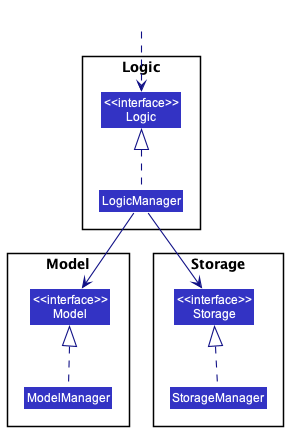
The sections below give more details of each component.
UI component
The API of this component is specified in Ui.java
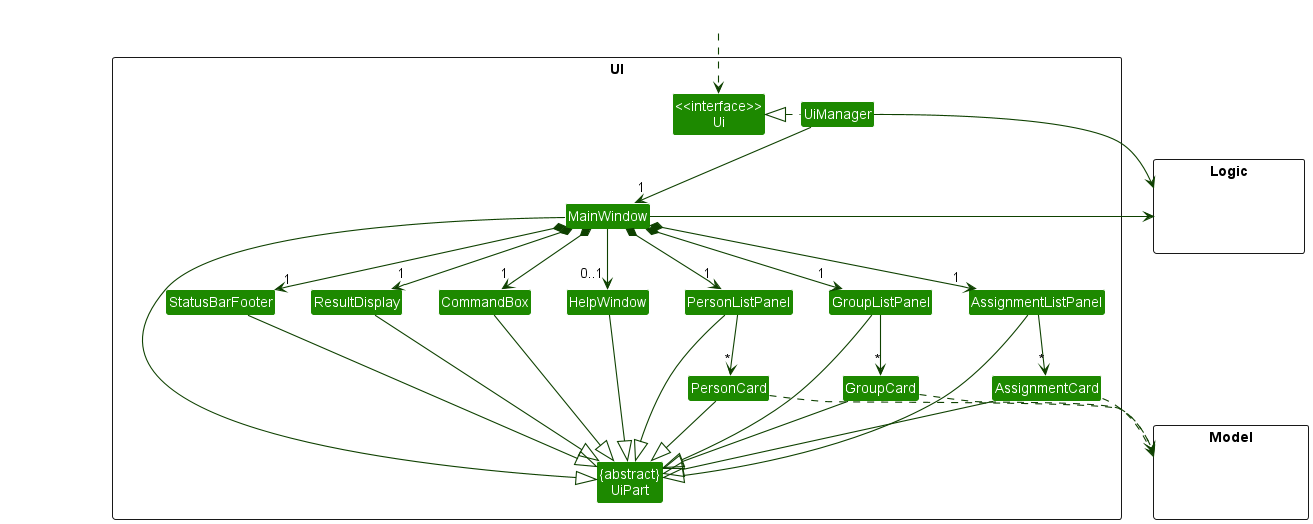
The UI consists of a MainWindow that is made up of the following parts e.g. CommandBox, ResultDisplay, PersonListPanel, StatusBarFooter, Help Window, AssignmentListPanel, GroupListPanel. All these, including the MainWindow, inherit from the abstract UiPart class which captures the commonalities between classes that represent parts of the visible GUI.
The UI component uses the JavaFx UI framework. The layout of these UI parts are defined in matching .fxml files that are in the src/main/resources/view folder. For example, the layout of the MainWindow is specified in MainWindow.fxml
The UI component,
- executes user commands using the
Logiccomponent. - listens for changes to
Modeldata so that the UI can be updated with the modified data. - keeps a reference to the
Logiccomponent, because theUIrelies on theLogicto execute commands. - depends on some classes in the
Modelcomponent, as it can displayPerson,Group,Assignmentobjects residing in theModel.
Logic component
API : Logic.java
Here’s a (partial) class diagram of the Logic component:
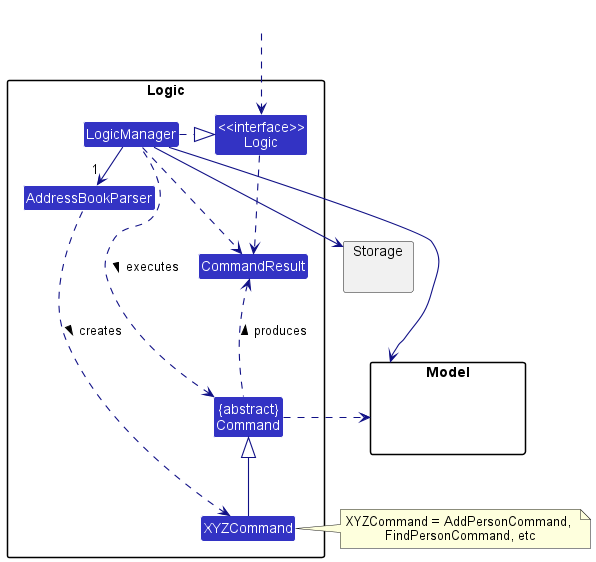
How the Logic component works:
- When
Logicis called upon to execute a command, it uses theAddressBookParserclass to parse the user command. - This results in a
Commandobject (more precisely, an object of one of its subclasses e.g.,AddPersonCommand) which is executed by theLogicManager. - The command can communicate with the
Modelwhen it is executed (e.g. to add a person). - The result of the command execution is encapsulated as a
CommandResultobject which is returned back fromLogic.
The Sequence Diagram below illustrates the interactions within the Logic component for the execute("deleteperson John") API call.
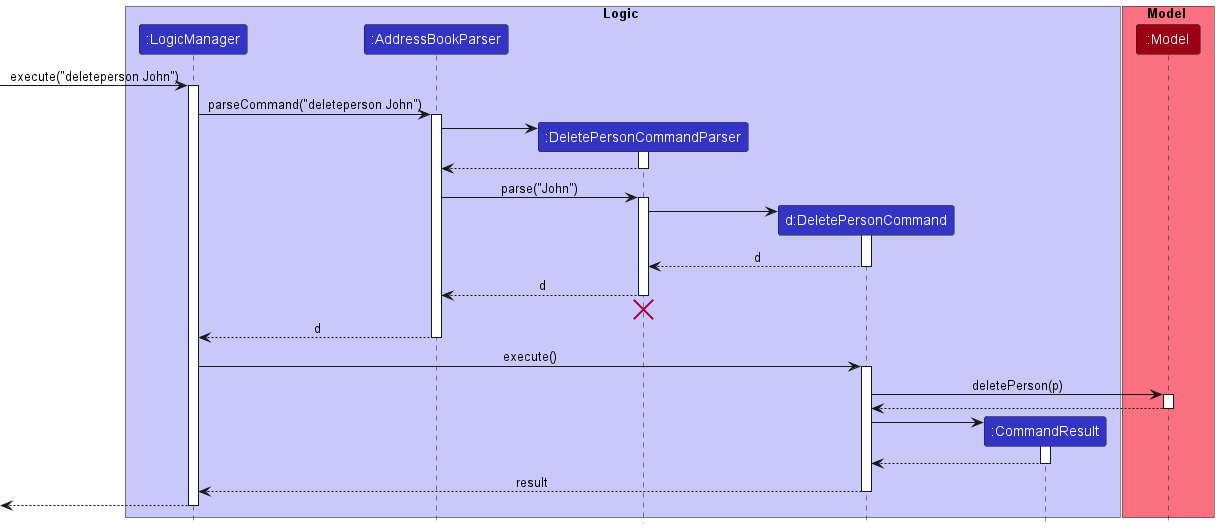
 Note: The lifeline for
 DeleteCommandParser should end at the destroy marker (X) but due to a limitation of PlantUML, the lifeline reaches the end of diagram.
Here are the other classes in Logic (omitted from the class diagram above) that are used for parsing a user command:
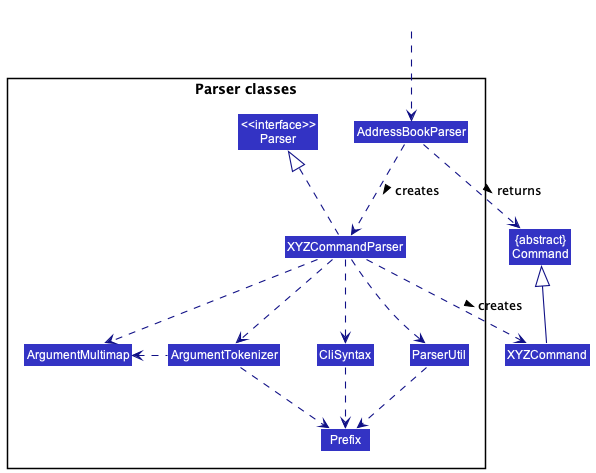
How the parsing works:
- When called upon to parse a user command, the
AddressBookParserclass creates anXYZCommandParser(XYZis a placeholder for the specific command name e.g.,AddPersonCommandParser) which uses the other classes shown above to parse the user command and create aXYZCommandobject (e.g.,AddPersonCommand) which theAddressBookParserreturns back as aCommandobject. - All
XYZCommandParserclasses (e.g.,AddPersonCommandParser,DeletePersonCommandParser, …) inherit from theParserinterface so that they can be treated similarly where possible e.g, during testing.
Model component
API : Model.java
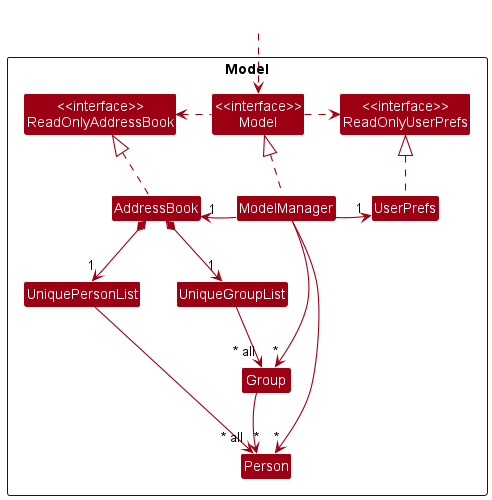
The Model component,
- stores the address book data:
- all
Personobjects (which are contained in aUniquePersonListobject). - all
Groupobjects (which are contained in aUniqueGroupListobject).
- all
- stores the currently ‘selected’
PersonorGroupobjects (e.g., results of a search query) as separate filtered lists which are exposed to outsiders as unmodifiableObservableList<Person>andObservableList<Group>that can be ‘observed’ e.g. the UI can be bound to this list so that the UI automatically updates when the data in the lists change. - stores a
UserPrefobject that represents the user’s preferences. This is exposed to the outside as aReadOnlyUserPrefobjects. - does not depend on any of the other three components (as the
Modelrepresents data entities of the domain, they should make sense on their own without depending on other components)
Person : Person.java
The Person component in relation to Addressbook and UniquePersonList is given in further detail here.
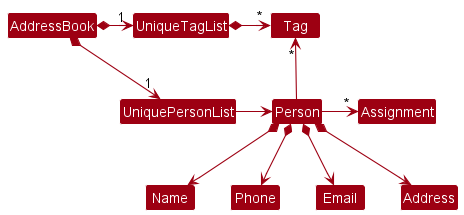
The Person component,
- is composed of
Name,Phone,Email,Addressmandatory attributes - references any number of
Tagsfrom theUniqueTagListinAddressbook. This allowsAddressBookto only require oneTagobject per unique tag, instead of eachPersonneeding their ownTagobjects. - references any number of
Assignmentsstored in aHashmap<key:String, value:ArrayList<ssignment>>. This enables keeping track of aPerson’s assignments under a specificGroup.
Group : Group.java
The Group component in relation to Addressbook and UniqueGroupList is given in further detail here.
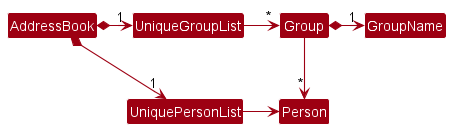
The Group component,
- is composed of
GroupNamemandatory attribute - references any number of
Personsfrom theUniquePersonListin Addressbook. This allowsAddressBookto only require onePersonobject per unique person, instead of eachGroupneeding their ownPersonobjects.
Assignment : Assignment.java
The Assignment component,
- is composed of
Taskmandatory attribute, which is a string description of theAssignment. - is composed of
Workloadmandatory attribute, coded as an enum ofHigh,MediumorLow. - has an optional
Deadlineattribute which is aLocalDateTimeobject.
Storage component
API : Storage.java
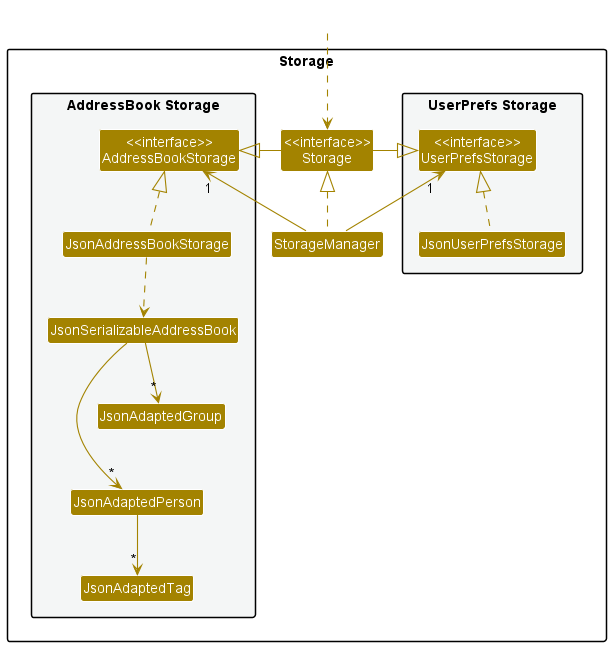
The Storage component,
- can save both address book data and user preference data in json format, and read them back into corresponding objects.
- inherits from both
AddressBookStorageandUserPrefStorage, which means it can be treated as either one (if only the functionality of only one is needed). - depends on some classes in the
Modelcomponent (because theStoragecomponent’s job is to save/retrieve objects that belong to theModel)
Common classes
Classes used by multiple components are in the seedu.addressbook.commons package.
Implementation
This section describes some noteworthy details on how certain features are implemented.
[Developed] Add/Delete Group feature
Implementation
This feature allows groups to be added to and deleted from TABS, facilitated by the UniqueGroupList.
It is achieved by the following operations:
-
Model#addGroup(GroupName)- Adds a group to TABS with the input groupname. -
Model#deleteGroup(GroupName)- Deletes the group with the input groupname, and removes any members and assignments associated.
Given below is an example usage scenario and how groups are added/deleted at each stage.
Step 1.
The user launches the application for the first time. Presuming they have not made changes to the default persons,
the AddressBook model looks like this (some Persons removed for simplicity):
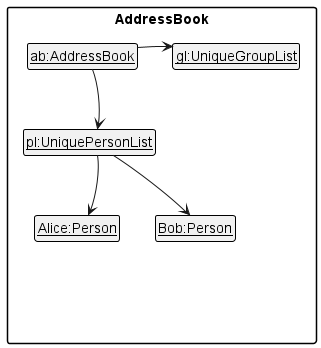
Step 2.
User executes addgroup g/CS2103T. This causes a new group with GroupName “CS2103T” and no members to be
added to the AddressBook model, reflected below:
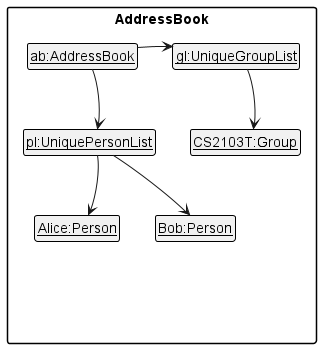
Note: The associated parser AddGroupCommandParser checks that the entered group name is valid, following same
conventions as naming a Person, and the command itself AddGroupCommand checks that a group of the same name does
not already exist in the app.
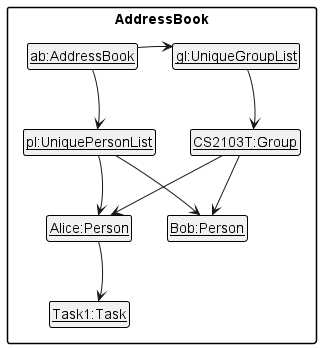
Step 3.
Suppose now the user adds Alice and Bob as members of group CS2103T as shown in this implementation.
Then, the user assigns Alice a task named Task1 under the group CS2103T as demonstrated in this implementation.
The AddressBook model now looks like this:
Step 4.
User executes deletegroup g/CS2103T. This deletes the group with GroupName “CS2103T” and additionally:
- Removes any members of the group e.g.
AliceandBobin this instance - Removes any tasks associated with the group e.g.
Alice’s task. TheAddressBookmodel now looks like this:
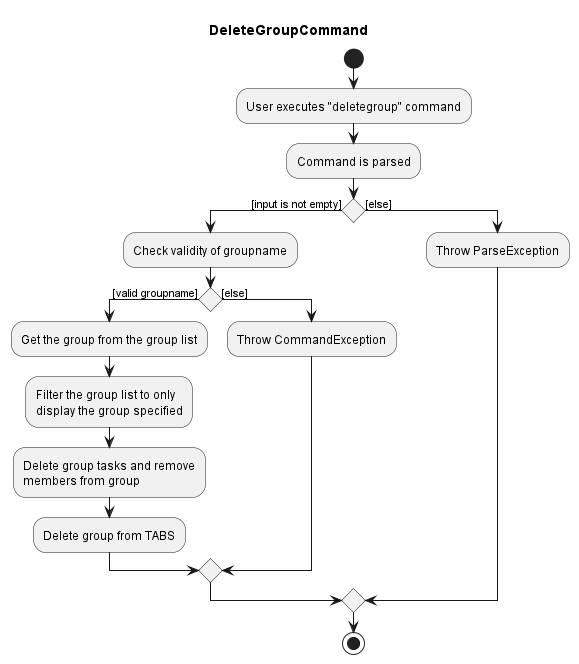
Note: The associated parser DeleteGroupCommandParser checks that the entered group name is valid, following same
conventions as naming a Person, and the command itself DeleteGroupCommand checks that a group with this name exists
in the app. Below is an activity diagram reflecting this:
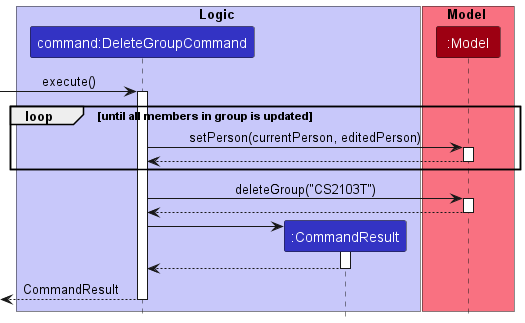
For simplicity, only the DeleteGroupCommand’s execution is shown below. Both commands operate via a similar sequence:
Design Considerations:
Aspect: Data Structure used to store Groups:
- Alternative 1 (current choice): Reference the
UniquePersonListinAddressBookclass- Pros:
- Design is consistent with existing system architecture.
- Cons:
-
UniquePersonListimplementation may be unfamiliar.
-
- Pros:
- Alternative 2: Use simpler data structure e.g. Sets/ArrayList
- Pros:
- Can leverage Java libraries, simple to implement.
- Cons:
- Design may not be consistent with existing system architecture.
- Run risk of not accounting for future features, have to design workarounds that weaken the data structure.
- May violate immutability principle employed in the existing system architecture.
- Pros:
[Developed] Add/Delete member feature
Implementation
This feature allows members to be added to and deleted from a group. It is achieved by the following operations:
-
Model#addMember(Name, GroupName)- Adds the person with the input name to the group with input groupname. -
Model#deleteMember(Name, GroupName)- Removes the person with the input name from the group with the input groupname.
Given below is an example usage scenario and how groups are added/deleted at each stage.
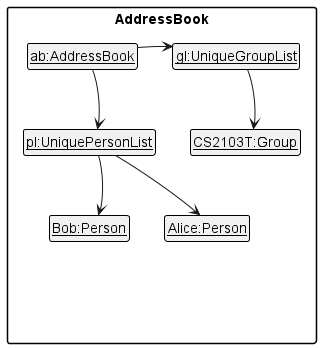
Step 1.
Starting from the default persons, the user has executed addgroup g/CS2103T to add a group with
GroupName “CS2103T”. The AddressBook model is reflected below:
Step 2.
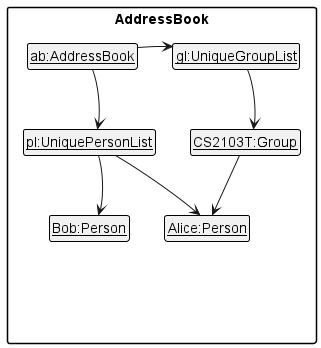
User executes addmember g/CS2103T n/Alice to add Alice to the
group CS2103T. The associated command AddGroupMemberCommand first
constructs an editedPerson and editedGroup to replace Alice and
CS2103T respectively, before calling Model#setPerson() and
Model#setGroup() with the respective edits to change Alice and
CS2103T in the AddressBook.
The AddressBook model is reflected below:
Note: The command itself AddGroupMemberCommand checks that both person Alice and group
CS2103T exist in the app, and that Alice is not already a member of CS2103T.
Step 3.
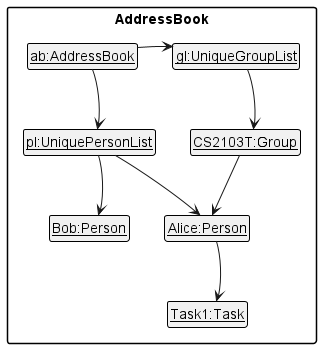
Suppose the user assigns Alice a task under the group. The AddressBook model now looks like this:
Step 4.
User executes deletemember g/CS2103T n/Alice. This removes Alice from CS2103T and removes any tasks
associated with the group. The associated command DeleteGroupMemberCommand first
constructs an editedPerson and editedGroup to replace Alice and
CS2103T respectively, before calling Model#setPerson() and
Model#setGroup() with the respective edits to change Alice and
CS2103T.
The AddressBook model now looks like this:
Note: The command itself DeleteGroupMemberCommand checks that both person Alice and group
CS2103T exist in the app, and that Alice is a member of CS2103T prior to deletion.
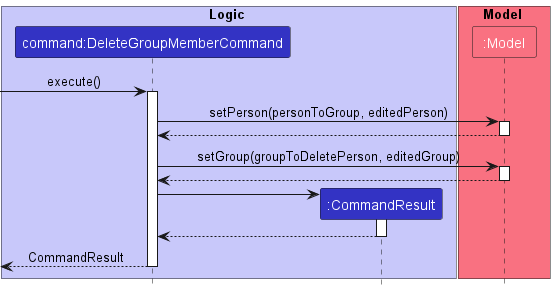
For simplicity, only the DeleteGroupMemberCommand’s execution is shown below. Both commands operate via a similar sequence:
Design Considerations:
Aspect: How a group maintains references to its members:
- Alternative 1 (current choice): Maintains a reference to a
Personobject.- Pros:
- When deleting group/performing groupwide assignment or deletion of task, easier to retrieve each member to be edited.
- Cons:
- Duplication of
Personin memory, may have performance issues.
- Duplication of
- Pros:
- Alternative 2: Maintain a String/
NameobjectPersononly.- Pros:
- No duplication of
Personin memory, thoughNameobject may be duplicated.
- No duplication of
- Cons:
- When deleting group/performing groupwide assignment or deletion of task, have to lookup the actual
Personobject in AB3 model; incur overhead.
- When deleting group/performing groupwide assignment or deletion of task, have to lookup the actual
- Pros:
- Alternative 3: References to
Groupmaintained in a member i.e. the other way around.- Pros:
- No duplication of
Personin memory.
- No duplication of
- Cons:
- Deleting group/performing groupwide assignment or deletion of task is even more difficult as
will have to perform linear scan of the entire
Personlist to surface affected members.
- Deleting group/performing groupwide assignment or deletion of task is even more difficult as
will have to perform linear scan of the entire
- Pros:
[Developed] Display/List Group feature
Implementation
This feature allows a single group to be listed, or displays all groups. It is facilitated by the following operations:
-
Model#displayGroup(GroupName)- Finds and lists the group with the input groupname. -
Model#listGroups()- Displays all groups in TABS
Given below is an example usage scenario and how groups can be individually displayed/displayed altogether in TABS.
Step 1.
Starting from the default persons, the user has executed addgroup g/CS2103T to add a group with
GroupName “CS2103T”.
Step 2.
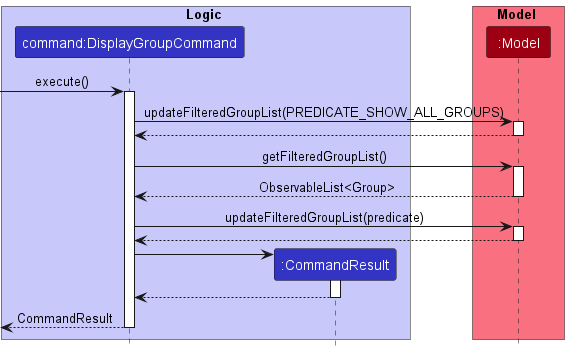
User executes displaygroup CS2103T. The associated command DisplayGroupCommand calls
Model#updateFilteredGroupList(predicate) with the given predicate being the GroupName CS2103T
to display just the group with that name.
Note:
DisplayGroupCommand first checks validity of input against the full group list, obtained as an
ObservableList<Group> from Model#getFilteredGroupList(). If the input GroupName does not correspond
to a group in this list, a CommandException will be thrown notifying the user accordingly.
Step 3.
User executes listgroups. The associated command ListGroupsCommand calls
Model#updateFilteredGroupList(PREDICATE_SHOW_ALL_GROUPS)to display all groups in the app.
For simplicity, only the DisplayGroupCommand’s execution is shown below. Both commands operate via a similar sequence:
[Developed] Assign/Delete Task feature
Implementation
This feature allows the user to assign a task to a member, or remove a task from a member. It is facilitated by the following operations:
-
Model#assignTask(GroupName, Name, Task, Workload, [Deadline])- Creates anAssignmentwithTask(description),Workloadand optionalDeadline. ThisAssignmentwill be added to the person with the input name, under the group with the input groupname (a person can hold multipleAssignmentsof the sameTask, but under different groups). -
Model#deleteTask(GroupName, Name, Task). Deletes theAssignmentwith descriptionTaskfrom the person with the input name, under the group with the input groupname.
Given below is an example usage scenario and how tasks are assigned/deleted at each stage.
Step 1.
Starting from the default persons, the user has executed addgroup g/CS2103T to add a group with
GroupName “CS2103T”, then addmember g/CS2103T n/Alice to add Alice to
the group CS2103T. The AddressBook model is reflected below:
Step 2.
User executes assigntask Alice g/CS2103T task/Task w/High. This:
- Constructs an Assignment with
Task“Task” andWorkload“High”. - Constructs an
editedPersonto replaceAlicewith a copy which includes this Assignment, and aneditedGroupcontaining the editedAlice. - Calls
Model#setPerson()andModel#setGroup()with the respective edits to changeAliceandCS2103Tin theAddressBook.
The AddressBook model is reflected below:
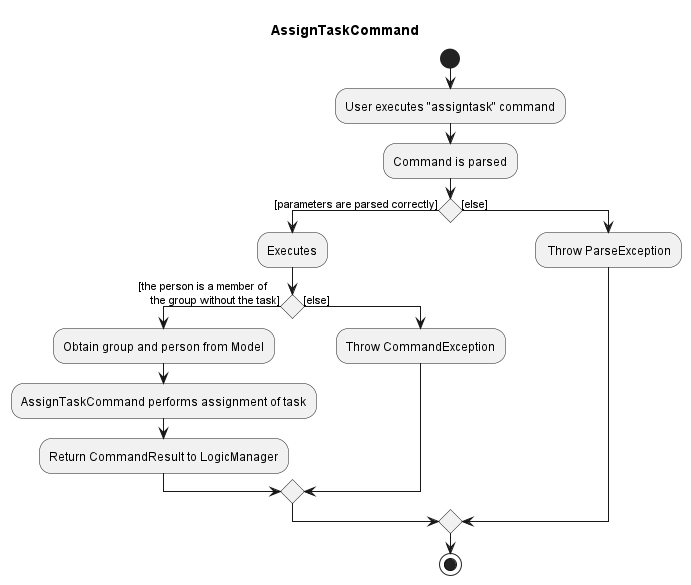
Note: AssignTaskCommandParser will check if the assignment’s parameters are parsed properly,
such as Task being non-empty, Deadline being a valid date, etc.
AssignTaskCommand further checks if both the person and group with the specified name and groupname respectively
exist in the app, that the person is a member of the group, and the person doesn’t already have a similar task under
the group.
The user flow of Assign Task can be illustrated in the Activity Diagram as shown below.
Step 3.
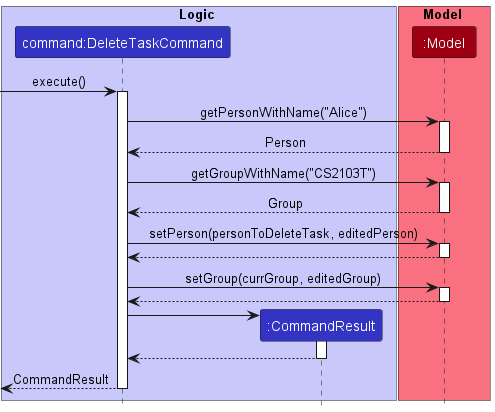
User executes deletetask Alice g/CS2103T task/Task. This constructs an editedPerson
to replace Alice with a copy which removes the Assignment whose Task matches input,
and an editedGroup containing the edited Alice. This also calls Model#setPerson() and Model#setGroup() with the respective
edits to change Alice and CS2103T in the AddressBook.
The AddressBook model is reflected below:
Note: DeleteTaskCommand checks if both the person and group with the specified name and groupname respectively
exist in the app, that the person is a member of the group, and the person has the specified task under
the group.
For simplicity, only the DeleteTaskCommand’s execution is shown below. Both commands operate via a similar sequence:
Design Considerations:
Aspect: Where task list should be maintained
- Alternative 1:
Groupobject stores a HashMap mappingPersonto task- Pros:
- Easy to implement
- Deleting tasks from a
Persondoes not require modification of thePersonobject.
- Cons:
- If the
Personis part of multiple groups, retrieving all tasks to display on their card requires referencing multipleGroupobjects.
- If the
- Pros:
- Alternative 2 (Current Option):
Personobject storesAssignmentsas a HashMap of<key:String, value:ArrayList<ssignment>>where the String is the group name.- Pros:
- Since a
Personobject can be in multipleGroups, storing all tasks inPersonincurs less overhead when all those tasks are displayed in the assignments view.
- Since a
- Cons:
- Deleting tasks from a
Personrequires modification of thePersonobject. This is compounded when multiplePersons are updated in one command i.e. bulk commands.
- Deleting tasks from a
- Pros:
[Developed] Bulk Assignment & Deletion of Tasks
Implementation
This feature allows tasks to be assigned to/deleted from all members of a group simultaneously. It is facilitated by the following operations:
-
Model#assignTaskAll(GroupName, Task, Workload, [Deadline]- Creates anAssignmentwithTask(description),Workloadand optionalDeadline. ThisAssignmentwill be added to all members in the group with the input groupname. A member who has the same task name is skipped over. -
Model#deleteTask(GroupName, Name, Task). Deletes theAssignmentwith descriptionTaskfrom all members in the group with the input groupname. A member who does not have this task is skipped over.
Given below is an example usage scenario and how tasks are assigned/deleted in bulk.
Step 1.
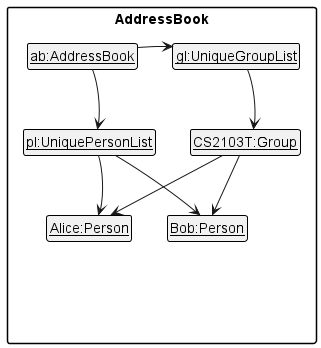
Starting from the default persons, the user has executed addgroup g/CS2103T to add a group with
GroupName “CS2103T”, then addmember g/CS2103T n/Alice, addmember g/CS2103T n/Alice to add Alice and Bob to
the group CS2103T. The AddressBook model is reflected below:
Step 2.
User executes assigntaskall g/CS2103T task/Task1 w/High. This:
- Constructs an Assignment with
Task1“Task” andWorkload“High”. - For each member
AliceandBob:- Constructs an
editedPersonto replace the member with a copy which includes this Assignment, and aneditedGroupcontaining the edited member. - Calls
Model#setPerson()andModel#setGroup()with the respective edits to change member andCS2103Tin theAddressBook.
- Constructs an
The AddressBook model is reflected below:
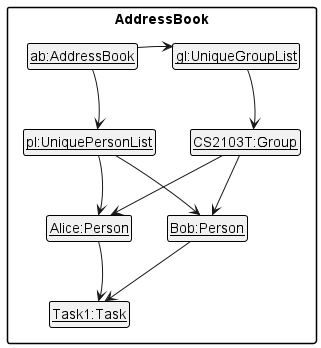
Note: AssignTaskAllCommandParser will check if the assignment’s parameters are parsed properly,
such as Task being non-empty, Deadline being a valid date, etc.
AssignTaskAllCommand further checks if group with the specified groupname exists in the app. Each member in the group
is handled in a for loop. Members who already have the assignment enter a continue block to the next iteration
and are not edited.
Step 3.
User executes deletetaskall g/CS2103T task/Task. Similar to above:
- For each member
AliceandBob:- Constructs an
editedPersonto replace the member with a copy which removes this Assignment, and aneditedGroupcontaining the edited member. - Calls
Model#setPerson()andModel#setGroup()with the respective edits to change member andCS2103Tin theAddressBook.
- Constructs an
The AddressBook model is reflected below:
Note: DeleteTaskAllCommand checks if group with the specified groupname exists in the app. Each member in the group
is handled in a for loop. Members who do not have the assignment enter a continue block to the next iteration
and are not edited.
For simplicity, only the DeleteTaskAllCommand’s execution is shown below. Both commands operate via a similar sequence:
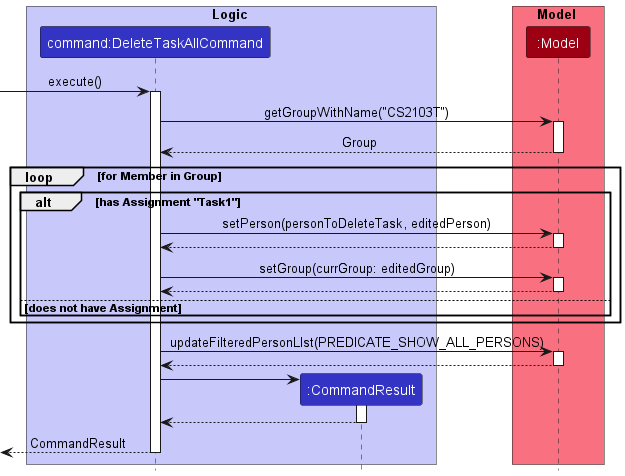
Design Considerations:
Aspect: How to handle Persons with duplicate task when assigning/no task when deleting:
- Alternative 1 (Current Option): Person who already has the same task name is skipped over
- Pros:
- More user-friendly; if the user does not know that a
Personalready has/does not have the assignment to be added/deleted respectively, the end result is close to the desired outcome.
- More user-friendly; if the user does not know that a
- Cons:
- Have to maintain a list of updated
Persons to feedback to user; more difficult to implement. - The task assigned previously is a different object to the one currently being assigned; can cause memory issues.
- Have to maintain a list of updated
- Pros:
- Alternative 2: Return CommandException
- Pros:
- Easier to implement.
- Cons:
- Less user-friendly; if the user does not keep track of tasks already assigned, cannot take advantage of the feature easily.
- Pros:
- Alternative 3: Replace tasks of the same name
- Pros:
- More user-friendly; if the user intends to replace the tasks previously assigned, the end result is close to the desired outcome.
- Since task objects are replaced, no duplication of tasks exists.
- Cons:
- In addition to the difficulties mentioned in Alternative 1, must also replace tasks inside a
Personobject; most difficult option to implement.
- In addition to the difficulties mentioned in Alternative 1, must also replace tasks inside a
- Pros:
Documentation, logging, testing, configuration, dev-ops
Appendix: Requirements
Product scope
Target user profile: Project team leaders with many projects, members and tasks to assign.
Value proposition:
- view information of which group members are in their project.
- track which tasks have been assigned to which members.
- see an estimate of how much workload each member has.
- receive information regarding upcoming deadlines.
User stories
Priorities:
- High (must have) -
* * * - Medium (nice to have) -
* * - Low (unlikely to have) -
*
| Priority | As a … | I want to … | So that I can … |
|---|---|---|---|
* * * |
beginner user | see usage instructions | refer to instructions when I forget how to use the App |
* * * |
beginner user | add contacts to my app | |
* * * |
beginner user | remove existing contacts on my app | remove entries that I no longer need |
* * * |
beginner user | create a group | |
* * * |
beginner user | add members to a group | |
* * |
intermediate user | locate a particular contact | quickly find a member |
* * |
intermediate user | have a quick overview of all my groups with their existing members | |
* * * |
intermediate user | assign tasks to members | |
* * |
intermediate user | have a quick overview of tasks assigned to members in the group | |
* * |
intermediate user | create a tag specific to the group project | quickly assign tags to members |
* * |
intermediate user | place tags on group members | better identify their role |
* * |
intermediate user | assign multiple tags to a user if needed | identify their roles more specifically |
* * |
intermediate user | filter and search for groups | quickly identify the one in particular |
* * |
advanced user | view deadlines for each project | periodically use this for self-reminder |
* * |
advanced user | have a rough sense of the workload of every member in the group | assign future tasks with more confidence |
* |
advanced user | view a member’s tasks in more detail | assign future tasks to them with more confidence |
* * * |
advanced user | add more tasks to a member | |
* * * |
advanced user | delete tasks from a member | |
* |
advanced user | categorise the tasks assigned into different levels of intensity | not judge workload based solely on the number of tasks per member |
* * * |
advanced user | delete unused groups after the project is completed | declutter my app |
* * * |
advanced user | delete existing tags if they are no longer relevant | declutter my app |
* |
advanced user | reuse existing tags in groups for future projects | establish new projects under my management style |
* |
advanced user | move tags and assignments from one user to another easily | ensure that members can ‘swap’ roles hassle-free |
* * |
expert user | perform group-wide addition of tags and assignments | ensure that repetitive new assignments are made as quickly and accurately as possible. |
* * |
expert user | perform group-wide removal of tags and assignments | ensure that group members’ roles are quickly cleared owing to new demands |
* |
expert user | be notified when a member completes his task or when a deadline is approaching | better manage my time |
* |
expert user | create shortcuts and pin most important projects on the top of the app | access these projects faster |
* |
expert user | have the choice of deleting users from the app when a project completes | quickly declutter my app |
* |
expert user | set timers to add/delete groups after a project ends | ensure that I do not have too many groups cluttering the database |
Use cases
For all use cases below, the System is TABS and the Actor is the user, unless specified otherwise.
UC1: Add a person
MSS
- User requests to add a person in TABS.
- TABS display that person is successfully added.
Use case ends.
Extensions:
1a. The person already exists in TABS.
1a1. TABS displays that the person already exists in TABS.
Use case ends.
1b. TABS detects missing or invalid required fields.
1b1. TABS displays the format of the command and the required fields.
Use case ends.
1c. TABS detects missing optional fields.
1c1. TABS sets the optional field to be empty.
Use case resumes at step 2.
UC2: Edit a person’s details
MSS
- User requests to edit an existing person in TABS.
- TABS displays the modified person.
Use case ends.
Extensions:
1a. The person specified is not found in TABS.
1a1. TABS displays that the person does not exist.
Use case ends.
1b. TABS detects missing or invalid required fields.
1b1. TABS displays the format of the command and the required fields.
Use case ends.
UC3: Find a person
MSS
- User requests to find an existing person in TABS by providing filters.
- TABS displays the person found based on the filter.
Use case ends.
Extensions
1a. TABS detects missing or invalid filters.
1a1. TABS displays the format of the command and the filter.
Use case ends.
1b. No person in TABS matches the filters provided.
1b1. TABS displays that no person is found.
Use case ends.
UC4: List every person
MSS
- User requests to list every person.
- TABS shows the list of every person in TABS.
Use case ends.
UC5: Delete a person
MSS
- User requests to delete an existing person in TABS.
- TABS displays that the person is successfully deleted.
Use case ends.
Extensions:
1a. The person specified is not found in TABS.
1a1. TABS displays that the person specified does not exist in TABS.
Use case ends.
1b. TABS detects missing or invalid required fields.
1b1. TABS displays the format of the command and the required fields.
Use case ends.
UC6: Add a group
MSS
- User requests to add a group in TABS.
- TABS adds the group.
Use case ends.
Extensions:
1a. The group already exists in TABS.
1a1. TABS displays that the group already exists in TABS.
Use case ends.
1b. TABS detects missing or invalid required fields.
1b1. TABS displays the format of the command and the required fields.
Use case ends.
UC7: Display a group
MSS
- User requests to display a group in TABS.
- TABS displays the group with its members.
Use case ends.
Extensions:
1a. The group specified is not found in TABS.
1a1. TABS displays that the group specified does not exist in TABS.
Use case ends.
1b. TABS detects missing or invalid required fields.
1b1. TABS displays the format of the command and the required fields.
Use case ends.
UC8: List all groups
MSS
- User requests to list all the groups in TABS.
- TABS displays all the group with their respective members.
Use case ends.
UC9: Delete a group
MSS
- User requests to delete a group in TABS.
- TABS displays that the group is successfully deleted.
Use case ends.
Extensions:
1a. The group specified is not found in TABS.
1a1. TABS displays that the group specified does not exist in TABS.
Use case ends.
1b. TABS detects missing or invalid required fields.
1b1. TABS displays the format of the command and the required fields.
Use case ends.
UC10: Add a person to a group
MSS
- User requests to add a person to a group in TABS.
- TABS displays that the person specified is added to the group specified.
Use case ends.
Extensions:
1a. The person specified or the group specified is not found in TABS.
1a1. TABS displays that the person specified or the group specified does not exist.
Use case ends.
1b. The person specified is already in the group specified.
1b1. TABS displays that the person specified is already in the group specified.
Use case ends.
1c. TABS detects missing or invalid required fields.
1c1. TABS displays the format of the command and the required fields.
Use case ends.
UC11: Remove a person from a group
MSS
- User requests to remove an existing person from an existing group.
- TABS displays that the person specified is removed from the group.
Use case ends.
Extensions:
1a. The person specified or the group specified is not found in TABS.
1a1. TABS displays that the person specified or the group specified does not exist.
Use case ends.
1b. The group specified does not have the person specified in TABS.
1b1. TABS displays that the person specified is not in the group specified.
Use case ends.
1c. TABS detects missing or invalid required fields.
1c1. TABS displays the format of the command and the required fields.
Use case ends.
UC12: Assign a task to a member
MSS
- User requests to assign a task to a member in TABS.
- TABS displays that the task is added and is tagged to the person specified under the group specified.
Use case ends.
Extensions:
1a. The person specified or the group specified is not found in TABS.
1a1. TABS displays that the person specified or the group specified does not exist.
Use case ends.
1b. The group specified does not have the person specified in TABS.
1b1. TABS displays that the person specified is not in the group specified.
Use case ends.
1c. The task specified already exists for the person specified in TABS.
1c1. TABS displays that the task specified already exists for the person specified in TABS.
Use case ends.
1d. TABS detects missing or invalid fields.
1d1. TABS displays the format of the command and the required fields.
Use case ends.
UC13: Remove a task from a member
MSS
- User requests to remove a task from a member.
- TABS displays that the task is successfully removed from that member.
Use case ends.
Extensions:
1a. The person specified or the group specified is not found in TABS.
1a1. TABS displays that the person specified or the group specified does not exist.
Use case ends.
1b. The group specified does not have the person specified in TABS.
1b1. TABS displays that the person specified is not in the group specified.
Use case ends.
1c. The person specified does not have the task specified in TABS.
1c1. TABS displays that the person specified does not have the task specified.
Use case ends.
1d. TABS detects missing or invalid fields.
1d1. TABS displays the format of the command and the required fields.
Use case ends.
UC14: Group assignment of task
MSS
- User requests to add a task to every member of a group.
- TABS displays that the task is successfully added to every group member.
Use case ends.
Extensions:
1a. The group specified is not found in TABS.
1a1. TABS displays that the group specified does not exist.
Use case ends.
1b. All the group members already have the task specified.
1b1. TABS displays that the all the group members already have the task specified.
Use case ends.
1c. The group does not consist any members.
1c1. TABS displays that the group does not have any members.
Use case ends.
1d. TABS detects missing or invalid fields.
1d1. TABS displays the format of the command and the required fields.
Use case ends.
UC15: Group removal of task
MSS
- User requests to remove a task from every member in a group in TABS.
- TABS displays that the task is successfully removed from every group member.
Use case ends.
Extensions:
1a. The group specified is not found in TABS.
1a1. TABS displays that the group specified does not exist.
Use case ends.
1b. The task specified is not found in the group specified in TABS.
1b1. TABS displays that the task specified does not exist in any group member.
Use case ends.
1c. The group does not consist any members.
1c1. TABS displays that the group does not have any members.
Use case ends.
1d. TABS detects missing or invalid fields.
1d1. TABS displays the format of the command and the required fields.
Use case ends.
Non-functional requirements
- Should work on any mainstream OS (Windows, Linux, Unix, OS-X) as long as it has
Java 11or above installed. - Should be able to hold up to 500 persons and/or 10 groups without noticeable sluggishness in performance.
- Bulk assignments/removals should be able to handle up to 20 persons without noticeable sluggishness in performance.
- Workload indicators, if using colours, should be easily distinguishable.
- Content should be saved to a save file that can be opened and edited with mainstream text editors e.g. Notepad.